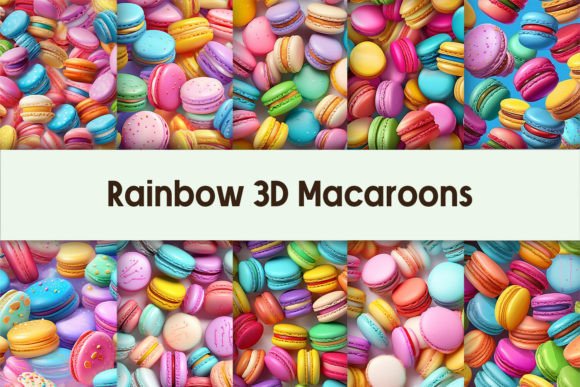
Unlocking the Sweet Potential of Rainbow 3D Macaroons Digital Paper for Your Creative Projects
There is a distinct joy in finding digital assets that instantly elevate a design from flat and functional to vibrant and inviting. The Rainbow 3D Macaroons Digital Paper collection taps directly into this sentiment, offering a whimsical yet professional aesthetic that resonates with audiences across various niches. Whether you are launching a new line of print-on-demand apparel, designing a cheerful classroom resource, or crafting a boutique shop banner, these high-resolution textures provide an immediate visual hook. However, simply downloading beautiful files is only half the battle. Many creators, from seasoned graphic designers to enthusiastic hobbyists, often stumble not because of a lack of talent, but due to overlooked technical details and usage misconceptions that can dilute the final product's quality.
When you acquire a set like this, which includes 10 PNG files at a substantial 4000x4000px size with 300 DPI resolution, you are holding a versatile toolset. Yet, a common misunderstanding arises regarding how "digital paper" functions compared to standard background images. Some users treat these files as mere backdrops, placing text directly over them without considering contrast or layering. This approach often results in legibility issues, especially with the intricate shadows and highlights inherent in 3D-rendered macaroon designs. To truly leverage the depth these images offer, one must treat them as textural elements within a broader composition rather than the sole focus. A better approach involves using blending modes in your design software or adding semi-transparent overlays to ensure your foreground content remains crisp and readable.
Navigating Resolution and Print Expectations
One of the most frequent pitfalls occurs when creators assume that high pixel dimensions automatically guarantee perfect print results regardless of the output method. While the 300 DPI specification is the gold standard for professional printing, confusion often sets in when scaling these images for vastly different products. For instance, using the full 4000x4000px canvas for a small sticker sheet is excellent, but attempting to stretch that same file to cover a large wall mural without checking the effective resolution can lead to pixelation. It is crucial to calculate the physical print size before committing to a production run. If you are designing for POD products like tote bags or mugs, the provided resolution is more than sufficient. However, for extra-large format wall art, you should verify the dimensions in your specific design software to ensure the dots per inch remain adequate for the viewing distance.
Furthermore, there is a tendency to overlook color management settings. Digital screens display colors in RGB, while printers use CMYK. The vibrant rainbow hues of these macaroons may shift slightly during the printing process if not properly profiled. A practical step to avoid disappointment is to order a single proof copy before launching a full inventory of products. This small investment saves significant cost and reputation damage in the long run. By understanding the gap between screen representation and physical ink, you can adjust your saturation levels proactively, ensuring the final product matches the sweet, colorful promise of the original digital file.
Maximizing Versatility Beyond Simple Backgrounds
Another area where potential is often left untapped is the application scope. Many buyers restrict themselves to using these assets solely for scrapbooking or basic website headers. In reality, the Rainbow 3D Macaroons Digital Paper set is robust enough for complex branding initiatives. Consider the texture's ability to serve as a pattern for packaging design or a subtle watermark for social media templates. A common mistake is failing to slice or crop the 4000px images effectively. Since you receive 10 distinct files, each likely features a unique arrangement of macaroons. Instead of using the whole image, try isolating specific clusters to create custom icons or border elements. This technique adds a cohesive brand identity that feels bespoke rather than generic.
Entrepreneurs and marketers should also be wary of over-cluttering their designs. The 3D effect brings a lot of visual weight; pairing it with equally busy fonts or competing patterns can create a chaotic user experience. The most successful implementations often pair these rich textures with clean, minimalist typography. Let the macaroons do the talking. If you are creating a shop banner, allow the negative space within the PNG files to guide your text placement. Remember, the goal is to enhance communication, not obscure it. By balancing the playful nature of the graphics with structured layout principles, you maintain professionalism while injecting personality.
Essential Checks Before You Begin Designing
Before diving into your next project, take a moment to evaluate your workflow against these practical considerations to ensure efficiency and quality:
- Verify File Integrity: Upon download, open each of the 10 PNG files immediately to ensure they render correctly and possess the promised transparency. Corrupted downloads happen, and catching them early prevents mid-project frustration.
- Assess Licensing Terms: Even with high-quality assets, always review the license agreement. Understand whether you can use the images for unlimited commercial projects or if there are restrictions on resale as standalone digital papers.
- Test Layer Compatibility: If you plan to use these in layered PSDs or Canva designs, test how the transparency interacts with your chosen background colors. Sometimes a white halo can appear around 3D elements if the extraction isn't perfect, though high-quality renders usually avoid this.
- Plan for Scalability: Decide early on if your design needs to adapt to multiple aspect ratios. The square 4000x4000px format is versatile, but you may need to create variations for Instagram stories versus YouTube thumbnails.
Ultimately, the value of these digital assets lies in how thoughtfully they are integrated into your work. The Rainbow 3D Macaroons Digital Paper offers a delightful foundation, but the final result depends on your attention to detail. By avoiding the traps of poor contrast, ignoring color profiles, and underutilizing the file capabilities, you transform a simple download into a powerful component of your creative toolkit. Whether you are an educator making engaging worksheets or a freelancer building a brand for a bakery client, these files provide the polish needed to stand out. Take the time to understand the tools you are using, experiment with different compositions, and always prioritize the end-user experience. With the right approach, these sweet visuals will not just decorate your projects—they will define them.