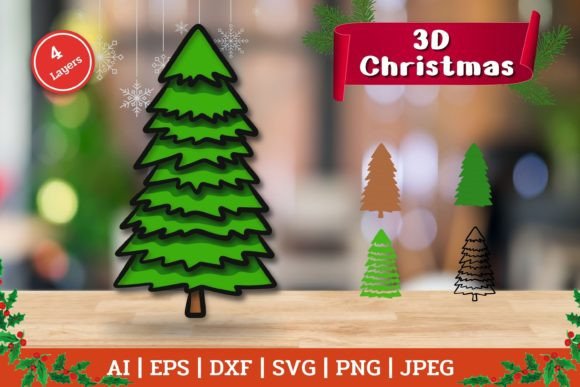
Crafting Depth: The 3D Layered Christmas Tree
The holiday season often invites us to move beyond flat decorations and explore dimensions that capture the spirit of the festivities. A 3D Layered Christmas Tree represents a shift from traditional two-dimensional crafting to creating objects with physical depth and shadow. This specific design approach involves stacking multiple cut layers of material, usually wood or cardstock, to build a silhouette that changes appearance depending on the viewing angle and lighting. When you work with a high-quality file set, such as an 8.5 x 8.5 inch design rendered at 300 DPI, you are accessing a blueprint for precision that translates digital vectors into tangible art.
Understanding the value of these layered designs requires looking at how different creators interact with digital files. The same asset serves vastly different purposes depending on whether the user is a weekend hobbyist, a small business owner, or an educator. The core appeal lies in the versatility of the file formats provided. A comprehensive package typically includes AI (Adobe Illustrator), EPS, SVG, DXF, JPEG, and PNG files. This variety ensures that regardless of the software or hardware in your workshop, the design is accessible and ready for production.
Why Dimensions Matter in Holiday Decor
For many consumers, the appeal of a 3D Layered Christmas Tree is purely aesthetic. In a market saturated with flat ornaments and printed images, a layered object offers texture. It catches light differently, casting shadows that give the illusion of a fuller, more organic tree without requiring fresh pine needles. For the home decorator, the priority is often presentation and uniqueness. They are looking for something that feels handmade and substantial. When a creator purchases a digital cut file, they are essentially buying the potential to create this tactile experience. The inclusion of color PNG or JPEG example files helps these users visualize the final product before committing to cutting materials, bridging the gap between digital concept and physical reality.
However, the evaluation criteria change significantly for those who operate laser cutters or CNC machines. For a maker using a Glowforge or similar device, the DXF file is often the most critical component. This format communicates precise paths to the machine, ensuring that each layer aligns perfectly with the next. If the layers are even a fraction of a millimeter off, the 3D effect collapses, and the assembly becomes frustrating. Therefore, professionals and experienced hobbyists prioritize the technical accuracy of the vector data over the visual preview. They need to know that the nodes are clean, the paths are closed, and the scaling is accurate to the stated 8.5 x 8.5 dimensions.
Tailoring the Project to Your Skill Level
One of the strengths of purchasing a pre-made layered design is its adaptability to various skill levels. Beginners often feel intimidated by the prospect of designing complex 3D structures from scratch. Calculating spacing between layers to achieve the desired depth requires an understanding of material thickness and perspective. By starting with a ready-to-use file, a novice can focus on the execution rather than the engineering. They can learn how different materials behave—how plywood bends slightly under tension or how cardstock holds a crisp edge—without the pressure of creating the geometry themselves. The availability of files compatible with user-friendly platforms like Cricut Design Space or Silhouette Designer Edition lowers the barrier to entry, allowing those with simpler equipment to participate in the trend.
Conversely, experienced designers and freelancers may view these files as a foundation for customization. A professional might take the base SVG file and modify the branch shapes, add personalized text, or integrate additional elements like stars or ornaments before sending it to the cutter. For them, the value lies in the flexibility of the source file, particularly the AI or EPS formats which allow for deep editing within vector software like Corel Draw or Inkscape. These users evaluate the purchase based on how easily they can manipulate the nodes and paths to create a unique derivative work for a client. The ability to scale the design without losing resolution is paramount here, which is why the 300 DPI raster backups and scalable vectors are essential.
Commercial Viability and Small Business Applications
For entrepreneurs and small business owners, time is a currency just as valuable as money. During the holiday rush, the ability to rapidly produce high-volume items is crucial. A well-structured zip file containing four distinct layered designs offers immediate variety. A vendor can produce a batch of trees in natural wood finish, another in painted white, and a third in festive red, all from the same digital source. The consistency of the file ensures that every unit produced looks identical, maintaining brand quality. Furthermore, the commercial value extends to marketing; the included color example images can be used immediately in online listings or social media posts to gauge customer interest before physical inventory is even created.
Educators and workshop leaders also find unique utility in these projects. Teaching the concept of layering is an excellent way to introduce students to spatial reasoning and manufacturing processes. A classroom setting might use the simpler JPEG or PNG outlines for tracing and hand-cutting exercises, while a more advanced fabrication lab utilizes the DXF files for laser cutting. The project teaches patience and assembly logic. Students learn that the order of operations matters; assembling the layers in the wrong sequence can ruin the structural integrity of the tree. This makes the 3D Layered Christmas Tree not just a decoration, but a pedagogical tool for understanding construction and design principles.
Making the Right Choice for Your Needs
When deciding if this type of digital asset fits your goals, consider your primary objective. If you are looking for a quick, one-off gift for a neighbor, the ease of use provided by the SVG format for die-cutting machines is likely your priority. You want a "load and go" experience. If you are a product developer testing a new line of holiday decor, your focus shifts to the editability of the AI files and the precision of the DXF outputs. You need to know that the design can withstand the rigors of mass production.
It is also important to remember what is not included. The background imagery seen in promotional listings is strictly for demonstration. The digital cut file contains only the tree layers themselves. This distinction is vital for managing expectations. The buyer is responsible for sourcing the material—whether that is birch plywood, acrylic, or heavy cardstock—and determining the appropriate adhesive for assembly. The success of the final piece depends on the harmony between the digital design and the physical materials chosen.
Ultimately, the 3D Layered Christmas Tree serves as a versatile bridge between digital convenience and analog craftsmanship. Whether you are a blogger looking for content, a marketer seeking seasonal visuals, or a hobbyist wanting to fill your home with handmade warmth, the utility of the file depends on how you wield it. By offering a suite of formats ranging from industry-standard vectors to web-ready images, these design packs accommodate a wide spectrum of creative intentions. The true value emerges when the creator matches the right file format to their specific tools and ambitions, transforming a simple download into a cherished holiday tradition.